Built from a working goalkeeper analysis workbook, so the numbers follow the way analysts already count.
Saves, goals, shots on target, penalty corners and strokes come from rule tables you can read and edit. If your club counts something differently, you change the rule, not the app.
A few taps per entry. That is the whole job.
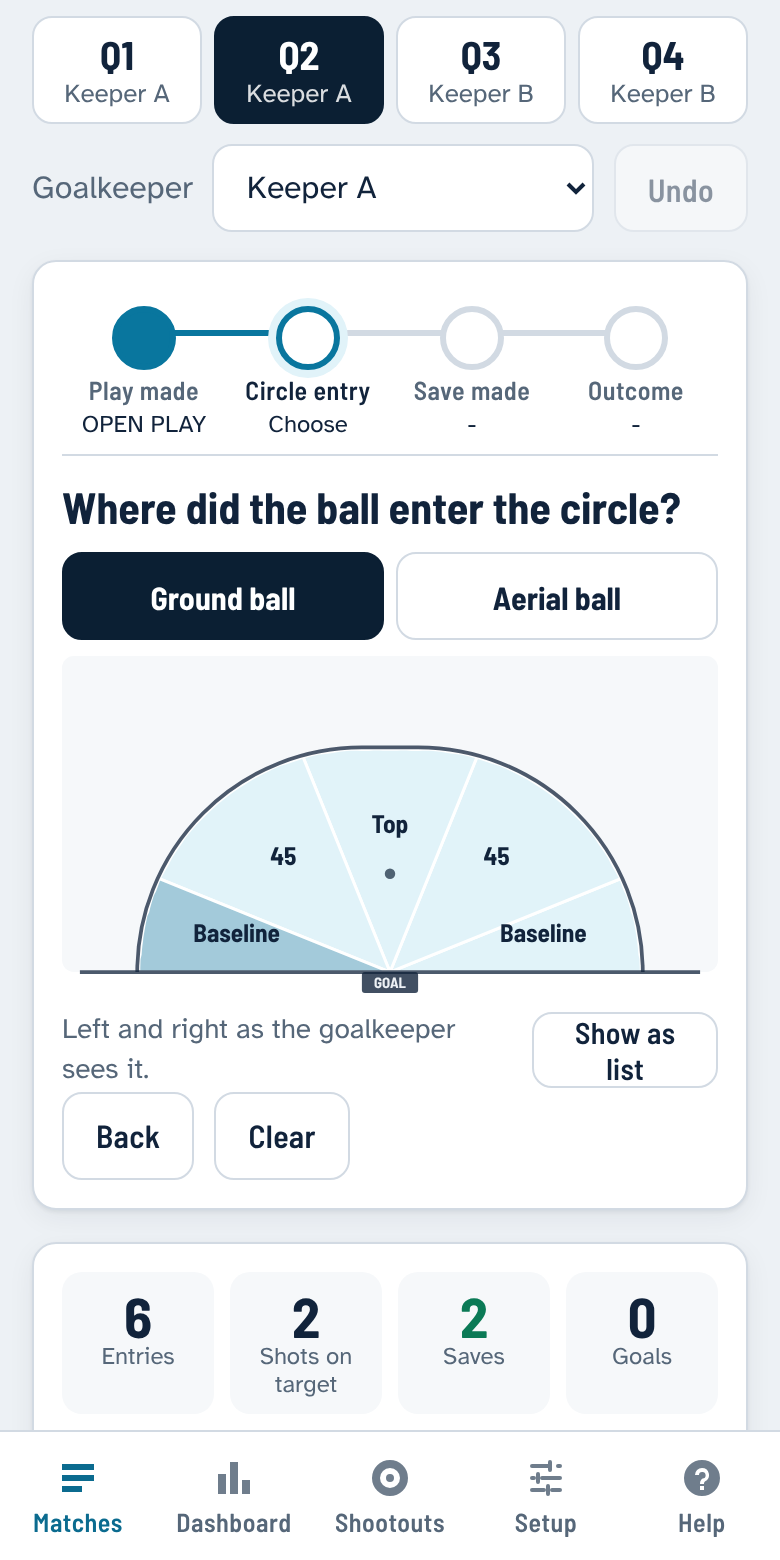
A wizard walks the capturer through each circle entry. Everything is a big button, and a step rail shows where you are. Mistakes are one tap to undo.
1
Play made
What led to the entry: open play, a free hit or sideline restart in the 23, a restart 23, a penalty corner or a penalty stroke. Add your own in Setup.
2
Circle entry
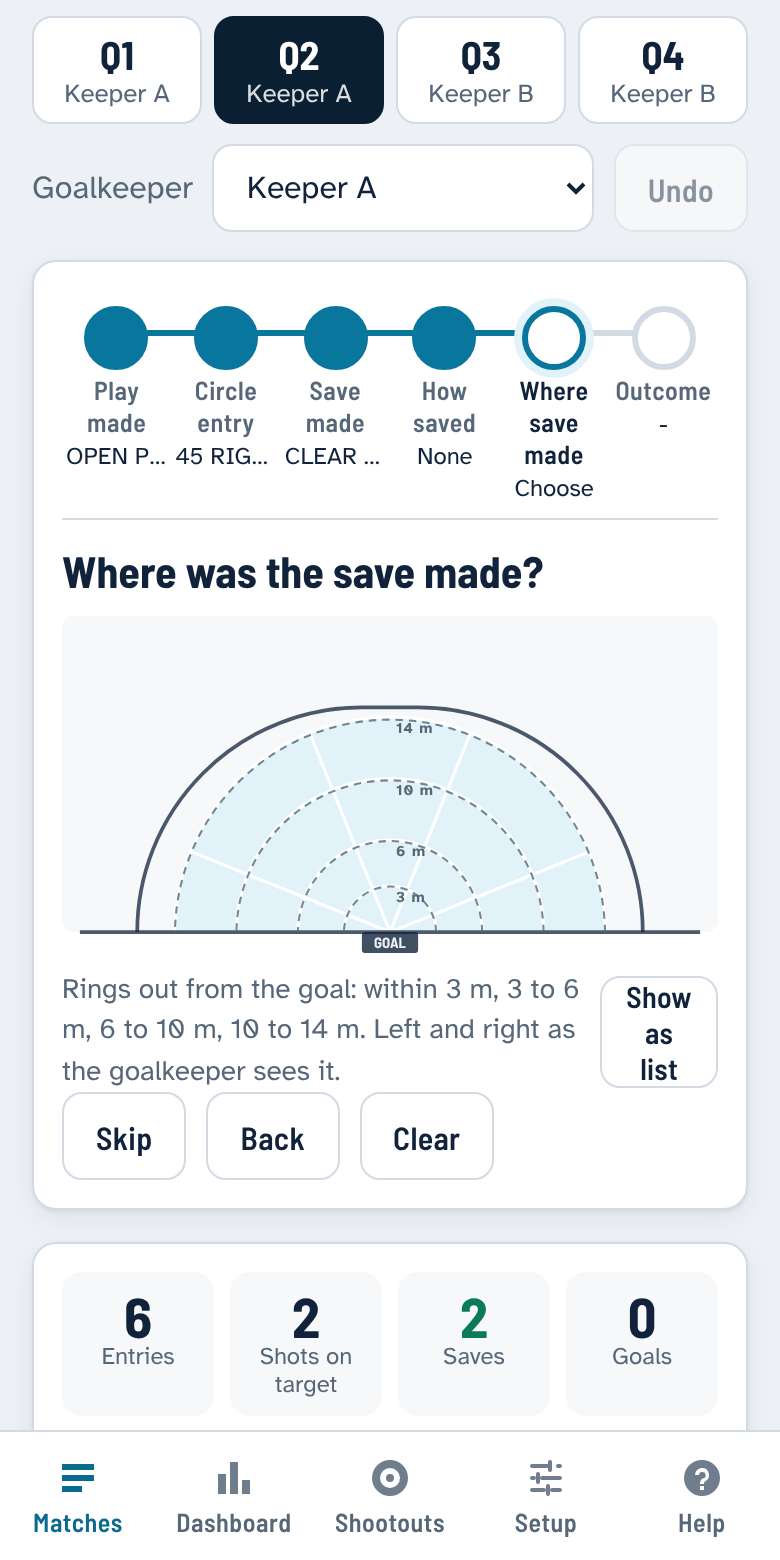
Tap the spot on a to-scale circle. Ground and aerial balls each get their own map, and a fourth map shows where on the circle the saves were made, in 20 zones out from the goal.
3
Save made
What the goalkeeper did. Each option is colour-coded green, amber or red by how safe the rebound was. No save? One button for that too. Want more detail? One optional tap records how the save was made: left foot, glove, dive, smother and more.
4
Where save made
Tap where the save happened: four rings out from the goal (within 3 m, 3 to 6, 6 to 10 and 10 to 14 m) across five sectors, 20 zones in all. Optional, one tap to skip.
5
Outcome
How the move ended. The most likely outcome is suggested from the save, so most entries need a single tap.
Where did it come from? Tap the circle.
The diagram is drawn to scale: a 14.63 m circle and a 3.66 m goal. Sectors follow the way coaches talk, such as baseline, 45 and top. Left and right are shown the way the goalkeeper sees them, and can be flipped in one setting.
Prefer a list? Switch to it any time. The app remembers your choice.

The same maps appear on every match review, shaded by how many entries came from each sector and where the saves were made.
Made for the touchline, and for the debrief.
Capture is fast. The review is honest. Your data is yours.
Works with no signal
Install it once and it runs fully offline. Capture a whole match with no reception, and the screen stays awake while you are logging.
Submit, then print the review
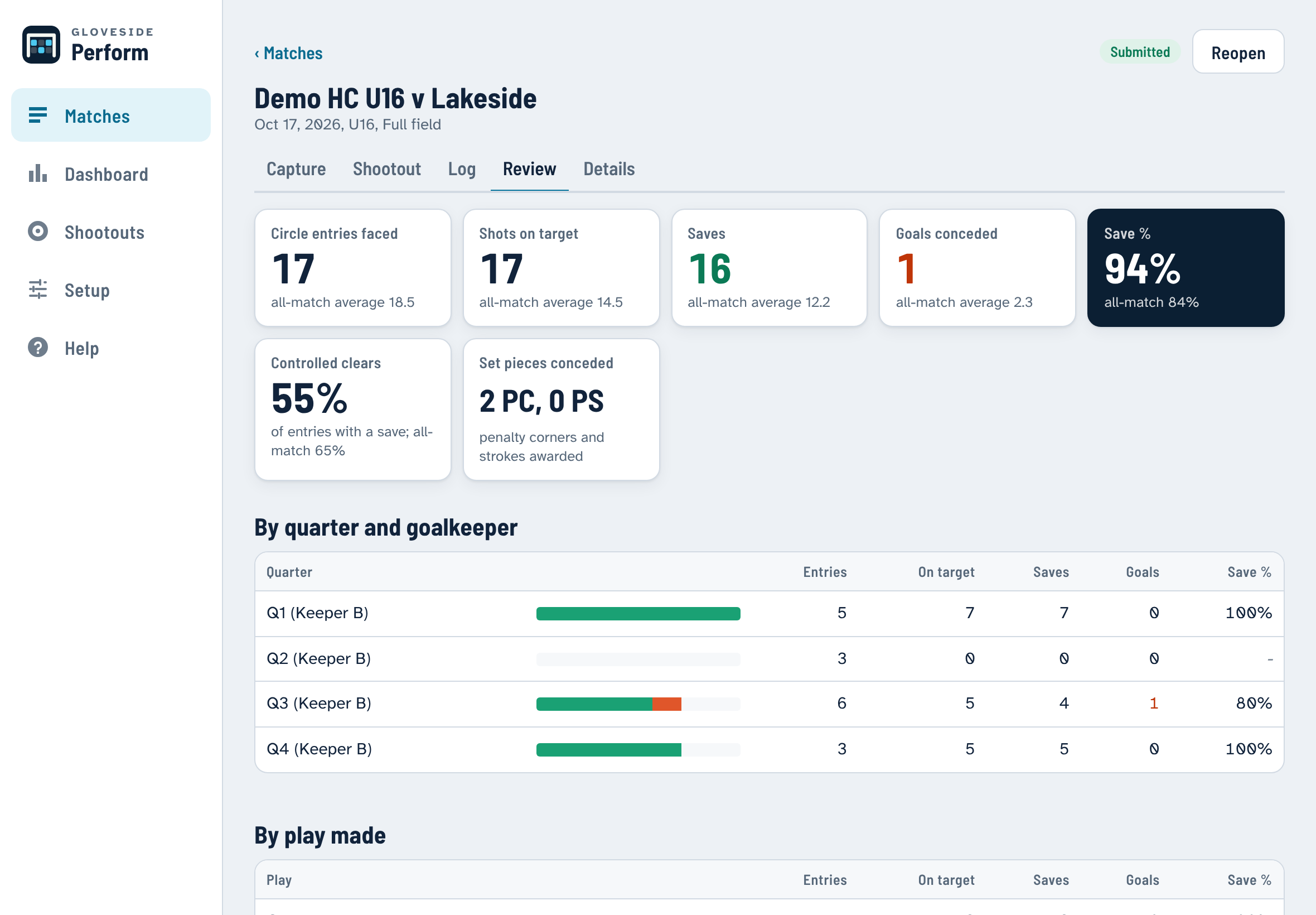
At the final whistle, submit the match. The app checks for gaps, locks the record, and gives you a match review to print or save as PDF. Reopen it if you need to fix something.
Percentages you can trust
Save percentage comes with its statistical range, and small samples are greyed out until there are enough shots to mean something. No more over-reading a 100% from three shots.
Rebounds and shootouts
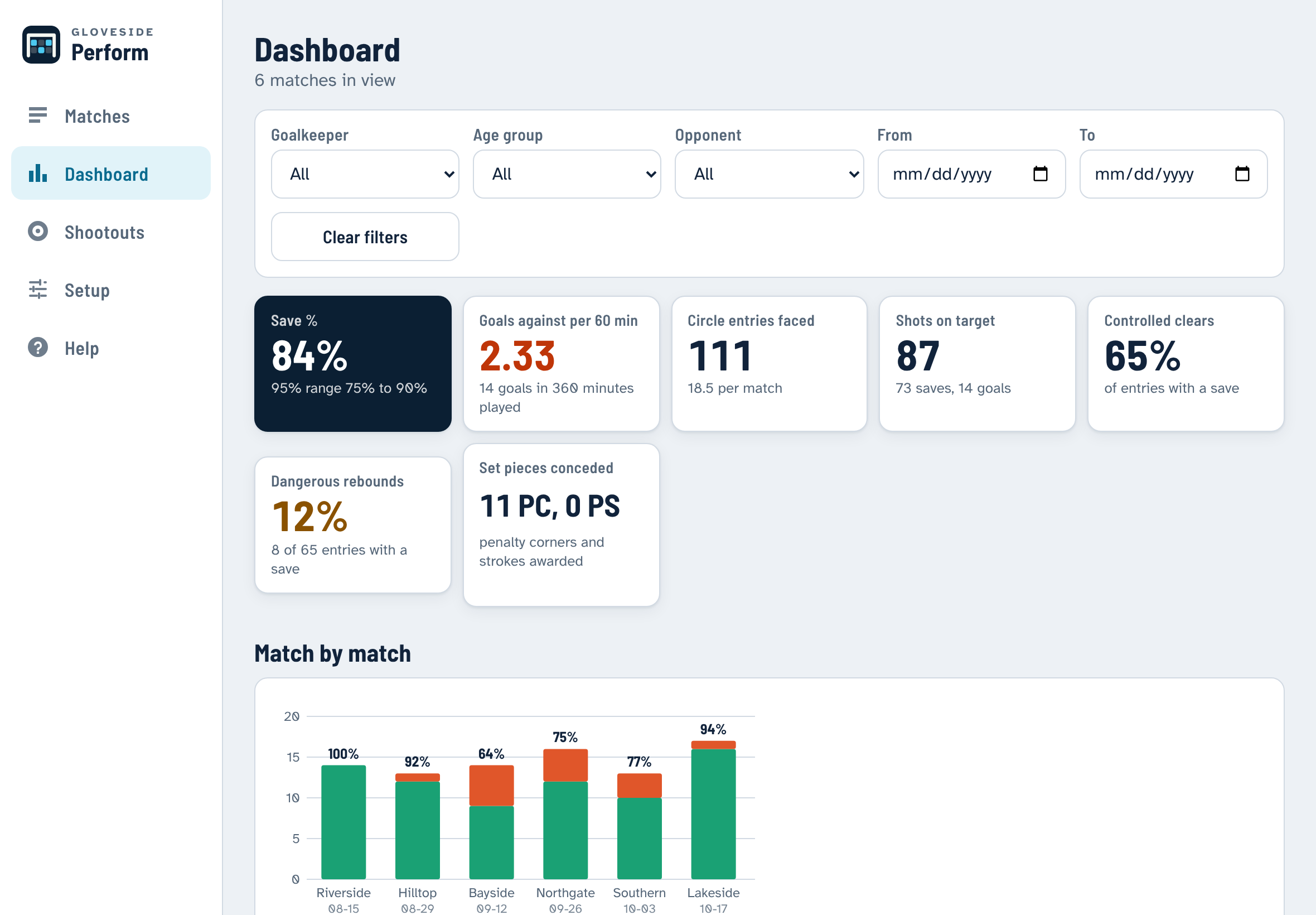
See controlled clears against dangerous rebounds, goals against per match, and set pieces conceded. A separate shootout log tracks entry direction, contact point and shot at goal.
Your rules, your lists
Plays, entries, save types, outcomes and the rule tables behind every statistic are editable in Setup. Track as many goalkeepers and age groups as you coach.
Your data stays with you
No account and no upload. Matches are stored on the device you capture on. Export a full backup or a spreadsheet-ready CSV whenever you like.
From the last whistle to the team meeting.
Each match review sets this match against your all-match averages, quarter by quarter and goalkeeper by goalkeeper. The dashboard does the same across a season, with filters for goalkeeper, age group, opponent and dates.
Run a pilot with your goalkeepers.
We are looking for goalkeeper coaches and clubs to use Gloveside Perform through a block of matches and tell us what to fix. You get to shape what gets built next.
The pilot is free. Pricing after the pilot has not been set yet.
Join the pilot
Free for the pilot. Tell us who you are and we will be in touch to get you started.
Prefer email? Write to goalieperform@gmail.com.
Install it in under a minute.
There is no app store. Tap Install the app, and your phone or computer adds it like any other app. After that it opens like any other app and works with no reception.
iPhone and iPad
- Open the app link in Safari.
- Tap the Share button.
- Tap Add to Home Screen.
Android phone or tablet
- Open the app link in Chrome.
- Tap Install on the banner, or the ⋮ menu then Install app.
- Open it from your home screen.
Laptop or desktop
- Open the app link in Chrome or Edge.
- Click the Install icon at the right of the address bar.
- Or just use it in the browser tab.
Your matches stay on your own device. Use Back up all matches in Setup now and then.
Questions coaches ask
Do I need a signal at the pitch?
No. After you install it once, the whole app runs offline. You only need a connection to install or update it.
Which devices does it run on?
Android phones and tablets, iPhone and iPad. It installs from the browser to the home screen like an app, so there is no app store step.
Where is my data kept, and can I take it with me?
On your device only. There is no account and nothing is uploaded. Export a full JSON backup or a CSV for Excel at any time, and restore a backup on a new device. The app reminds you when your last backup is more than a week old.
Can my club count things differently?
Yes. The lists of plays, entries, saves and outcomes, and the rules that turn them into saves, goals and shots on target, are all editable in Setup.
What if my phone runs low on storage?
Phones can clear stored data from apps that have not been opened for a long time. Adding the app to your home screen and taking a backup after each round protects you from that.
What does it cost?
The pilot is free of charge during the pilot testing period. Pricing after the pilot has not been set yet.
Terms of Service – Pilot Program
- Scope. These Terms govern your access to and use of the software concept pilot program (“Pilot”).
- Acceptance. By accessing or using the Pilot, you agree to be bound by these Terms.
- Free Access. The Pilot is provided to you free of charge during the designated pilot testing period.
- “As-Is” Status. The software is a test-phase concept provided strictly on an “AS IS” and “AS AVAILABLE” basis.
- No Warranties. We disclaim all warranties, express or implied, including merchantability and fitness for a particular purpose.
- Limitation of Liability. Under no circumstances shall the developer or provider be liable for any errors, bugs, or system interruptions.
- No Damages. We are not liable for any direct, indirect, incidental, consequential, or property damages arising from your use.
- Feedback & Data. Any feedback or test data you provide may be used to refine and improve the software without obligation.
- Termination. We reserve the right to modify, suspend, or discontinue the Pilot at any time without prior notice.
- Entire Agreement. These Terms constitute the complete agreement regarding the Pilot and supersede any prior understandings.